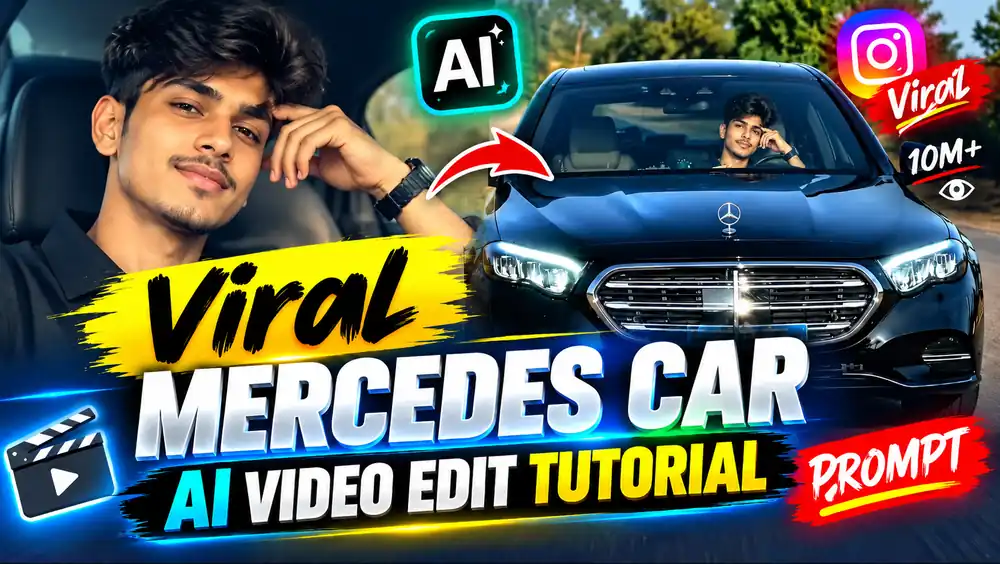
Have you noticed the viral Mercedes car videos appearing on Instagram, where people use AI to create realistic videos of themselves sitting inside a luxury car? These videos are currently attracting attention because of their cinematic appearance, smooth camera movements, and realistic facial expressions. Many creators are using AI tools to transform their ordinary photos into professional-looking car videos without recording inside an actual Mercedes-Benz.
If you have also seen these videos and want to create one using your own photo, you are in the right place. In this article, I will explain the complete process of creating a viral Mercedes car AI video, including the reference video, AI prompt, image requirements, and video-generation steps.
You do not need expensive camera equipment or professional video-editing software for this process. You simply need a suitable reference video, a clear photo, and an AI video-generation tool. By following the instructions carefully, you can try creating your own version of this trending video style.
So, let’s understand the process step by step.
Refrence Video :-
Details of Viral Mercedes Car AI Video Editing
You may have already watched several AI-generated Mercedes car videos on Instagram. In these videos, a person appears to be sitting inside a luxury car, looking toward the camera, moving their hand, and giving a confident smile. The combination of realistic car interiors, natural lighting, and cinematic camera movements makes these videos look like actual recordings.
The interesting part is that many creators do not need to shoot the entire video themselves. Instead, they use AI tools to generate a similar scene based on a reference video and a personal image.
Some viral videos associated with creators such as “Bharat Thakur” and “Time Pass” have inspired others to make their own versions. Users may use AI to replace the character, adjust facial identity, and recreate specific gestures or movements.
However, the final result depends on the AI tool, the quality of the reference material, and the prompt you provide. A generated video may not reproduce every movement perfectly, so you should review the result before publishing it.
Why Is This Mercedes AI Video Trend Popular?
There are several reasons why this style of video attracts attention on social media.
First, the Mercedes-Benz car provides a luxury and cinematic visual setting. The black exterior, premium interior, steering wheel, and windshield reflections create an impressive appearance.
Second, users can personalize the video with their own faces. Instead of hiring actors or arranging a luxury car shoot, they can experiment with AI-generated scenes.
Third, the short-video format works well for platforms such as Instagram Reels and YouTube Shorts. A video lasting a few seconds can quickly communicate the scene and encourage viewers to watch it again.
Still, creating an attractive video does not guarantee that it will go viral. Audience interest, originality, timing, and content quality also influence performance.
Reference Video for Mercedes AI Editing
To create a video similar to the original format, you should use a reference video. The reference helps the AI understand the desired scene, camera position, vehicle movement, and character actions.
You can access the reference video through the link below:
Download Reference Video
Before starting, watch the reference video carefully. Pay attention to the following details:
- How the Mercedes car approaches the camera.
- The camera angle and distance.
- The transition from the exterior to the interior.
- The position of the person inside the vehicle.
- The hand gestures and head movements.
- The lighting and overall visual appearance.
These details can help you understand what you want the AI to reproduce.
Mercedes Car AI Video Prompt
The prompt is an important part of the process. It explains how the generated video should look and how the character should behave.
For better results, use two references whenever the selected AI tool supports them:
- Reference Video: Controls the desired camera movement, timing, scene composition, car movement, and actions.
- Character Image: Provides the identity and appearance of the person you want to include in the video.
Use a clear, high-quality character photo. The face should be visible, and the lighting should be reasonably good. Avoid using heavily blurred images or photos where the face is hidden.
The following prompt is designed for a realistic Mercedes car video:
Copy AI Video Prompt
Create a highly realistic 10-second cinematic video using the uploaded reference video and character image.
Use the reference video to guide the car movement, camera angle, framing, timing, lighting, environment, and overall composition. Use the uploaded character image as the primary identity reference for the person.
The final video should look like genuine real-world camera footage rather than a 3D animation, CGI render, or game-engine scene.
Character Identity and Appearance
Preserve the person’s identity throughout the video. Maintain the same facial structure, eyes, eyebrows, nose, lips, jawline, skin tone, hairstyle, facial hair, age, and natural facial proportions as shown in the uploaded image.
Do not unnecessarily change the person’s face or make the character look like a different individual. Preserve realistic skin texture, natural facial asymmetry, and subtle imperfections.
Avoid excessive skin smoothing, artificial beauty filters, exaggerated facial features, or an overly polished AI-generated appearance.
The face should remain consistent from the beginning to the end of the video. Avoid identity drift, facial warping, frozen expressions, or unnatural mouth and eye movements.
Realistic Camera and Visual Quality
Create the video with realistic camera characteristics, including:
- Natural exposure and dynamic range.
- Realistic motion blur.
- Natural depth of field.
- Believable focus transitions.
- Subtle sensor noise.
- Realistic reflections and shadows.
- Natural skin texture.
- Physically believable lighting.
Do not make the video excessively sharp, oversaturated, glossy, or artificially perfect. The final footage should resemble a real camera recording.
Mercedes-Benz Car Appearance
The car should look like a real black Mercedes-Benz sedan. Preserve realistic details such as the metallic black paint, Mercedes emblem, grille, headlights, windshield, side mirrors, dashboard, steering wheel, leather seats, and interior materials.
The vehicle should not look like a computer-generated model. Reflections on the car’s body and windshield should be physically believable.
The windshield should include realistic transparency, subtle reflections, and natural highlights. The driver’s face should remain visible without being completely hidden by artificial reflections.
Scene and Camera Movement
Recreate the camera movement and vehicle motion shown in the reference video. If the car approaches the camera, its size should increase naturally because of physical movement through space, not because of an artificial digital zoom.
Maintain realistic perspective changes, wheel movement, and vehicle motion. The car must not appear to float, slide, or move like a 3D animation.
Match the reference video’s camera height, distance, lens perspective, framing, movement speed, and timing as closely as the tool allows.
Do not invent camera movements that are not present in the reference.
Scene 1 – Exterior Mercedes Car Shot
Begin with an exterior shot of the black Mercedes-Benz approaching the camera.
Maintain a front-facing composition similar to the reference video. As the vehicle moves closer, naturally reveal details of the grille, Mercedes emblem, headlights, hood, windshield, and driver.
The person should appear physically seated inside the vehicle. Use natural daylight or the lighting conditions shown in the reference video.
Ensure that the car’s paint, glass, and metallic components reflect the surrounding environment realistically.
Scene 2 – Interior Transition
At the appropriate moment, transition from the exterior shot to the interior scene according to the reference video.
Do not introduce an unrelated transition or a new camera angle that does not match the reference.
Scene 3 – Interior Mercedes Shot
Show the person sitting naturally in the driver’s seat.
Keep the steering wheel visible in the foreground. Include realistic dashboard materials and a beige or cream-colored leather interior if that matches the reference.
The person should look naturally toward the side and then toward the front or camera, following the reference movement.
One hand should remain in a believable position near the steering wheel when appropriate.
Scene 4 – Natural Human Movement
Recreate the character’s hand gestures, head movement, eye direction, and smile as shown in the reference.
Movements should be subtle and physically realistic. Include natural blinking, breathing, shoulder movement, and head rotation.
Hands must have correct anatomy, including five fingers on each hand, realistic joints, natural wrist movement, and proper proportions.
Avoid extra fingers, fused fingers, disappearing hands, or distorted palms.
Scene 5 – Final Expression
Recreate the final head position and facial expression from the reference.
The person should give a subtle and natural smile. Avoid exaggerated expressions or unnatural facial movement.
Maintain consistent identity and realistic skin texture throughout the video.
Lighting and Color
Match the lighting conditions of the reference video.
Light should interact naturally with the person’s face, hair, windshield, metallic car paint, steering wheel, dashboard, and leather seats.
Use realistic shadows, natural highlights, and believable color science. Avoid excessive cinematic glow, artificial rim lighting, HDR effects, and oversaturation.
The final video should look like a real camera recording of a person inside a physical Mercedes-Benz car.
How to Create Viral Mercedes Car AI Video
Now that you have the prompt, let’s discuss the actual process of generating the video.
You do not need advanced video-editing knowledge to try this method. However, you should follow each step properly because uploading the wrong reference image or using an unsuitable video can affect the output.
Step 1: Copy the AI Video Prompt
First, scroll to the prompt section of this article and copy the complete prompt.
Make sure you copy the relevant instructions instead of selecting only a small portion. The prompt explains the character identity, camera movement, vehicle appearance, lighting, and scene actions.
If you are using a tool with separate image and video reference options, keep both files ready before starting.
Step 2: Open an AI Video Generation Tool
Next, open an AI video-generation platform that supports the features you need.
You can explore the following options:
The available features may differ between tools, accounts, regions, and subscription plans. Before beginning, check whether your selected platform supports image-to-video generation and reference-video workflows.
Step 3: Upload Your Character Image
Choose a clear image of the person you want to use in the video.
For better identity consistency, select a photo where the face is clearly visible. Avoid images with heavy filters, extreme shadows, or obstructions.
If you are using someone else’s photo, make sure you have their permission. Do not use AI face replacement to mislead people about a real person or create deceptive content.
Upload the character image in the appropriate reference section.
Step 4: Upload the Reference Video
Now upload the reference video.
This video should guide the desired scene, camera movement, and character actions. If the tool supports reference-video input, follow its upload instructions.
Some platforms may not reproduce the reference exactly. The output can vary depending on the model’s capabilities and the complexity of the movement.
Step 5: Paste the Prompt
After uploading the necessary references, paste the AI prompt into the prompt box.
Read through the instructions once before submitting. If you want a vertical video for Instagram Reels, mention the desired aspect ratio where supported.
For short-form social media content, the 9:16 ratio is generally suitable.
Step 6: Generate the Video
Submit the prompt and wait for the tool to process your request.
Generation time depends on the platform, video length, server availability, and account type. Some tools may require credits or a paid subscription.
Once the video is ready, watch it carefully. Check whether the face remains consistent, the hands look natural, and the car movement resembles the reference.
If the result contains errors, you may need to change the prompt or try another generation.
What Is Google Flow AI?
Google Flow is an AI-powered creative video tool designed to help users develop visual scenes and cinematic content.
Depending on the features available to your account, you may be able to work with text prompts, images, and video-generation workflows.
AI video tools can be useful for creating:
- Cinematic image-to-video scenes.
- Character animation.
- Camera movement experiments.
- Short-form social media content.
- Story-based visual sequences.
The exact features, access requirements, credits, and generation limits can change. Therefore, you should check the official platform for current information before relying on any particular offer or usage limit.
For this Mercedes AI video tutorial, focus on whether the tool supports the reference inputs you need and whether it can generate the desired video format.
Google Flow AI Unlimited: How to Access It for Free
Many users are interested in generating AI videos without spending money. However, free access and unlimited generation are not necessarily available to every user.
The original article mentions a Jio recharge offer related to Gemini services. Such promotional offers may have eligibility conditions, expiration dates, or different benefits depending on the user and plan.
If you want to check whether you qualify for an offer, open the official MyJio app or the relevant official service page. Read the current terms carefully before claiming anything.
Do not assume that a particular recharge automatically provides unlimited access to every AI tool. Subscription benefits can change, and third-party claims may not accurately reflect the current offer.
Always verify the details through official sources.
Tips for Creating a More Realistic Mercedes AI Video
If your first video does not look realistic, do not immediately assume that the tool is useless. The quality of your references and the clarity of your instructions can make a difference.
Here are a few useful tips:
Use a High-Quality Character Image
A clear photo helps the AI understand facial features. Use a well-lit image with minimal blur and a visible face.
Choose a Suitable Reference Video
A reference video with clear camera movement and stable framing can make it easier to communicate the desired scene.
Avoid Overloading the Prompt
A very long prompt may not always produce better results. Include the most important instructions and prioritize identity, movement, camera, and scene consistency.
Check the Hands and Face
AI-generated videos can sometimes produce distorted fingers, facial changes, or unnatural expressions. Review these areas before uploading the video.
Use the Correct Aspect Ratio
For Instagram Reels and YouTube Shorts, a vertical 9:16 format is commonly used. Confirm that the selected tool supports your desired output dimensions.
Try Multiple Generations
Your first result may not match the reference. If the tool allows it, adjust the prompt or try another generation while maintaining the intended scene.
Conclusion
In this article, I have explained how to create a viral Mercedes car AI video using a reference video, character image, and AI video-generation prompt.
You can use this method to experiment with realistic car scenes and create personalized content for social media. The process involves selecting suitable references, uploading your image, adding the prompt, choosing the desired aspect ratio, and generating the video.
Remember that AI-generated results are not always perfect. Facial consistency, hand movements, camera transitions, and car details may require multiple attempts.
If you want to create your own Mercedes AI video, follow the steps carefully and review the final output before posting it. Use original or authorized reference material, respect people’s privacy, and avoid presenting AI-generated footage as genuine real-world recording.
I hope this tutorial helps you understand the Mercedes car AI video editing process. Keep experimenting with different prompts and creative ideas.
See you in the next article!