Prompt
STRICT IDENTITY LOCK (HIGHEST PRIORITY): Use the uploaded reference image as the ONLY source for the person’s facial identity. Preserve the exact face shape, hairstyle, beard, skin tone, facial proportions, expression, and body posture. Do not change or beautify the face.
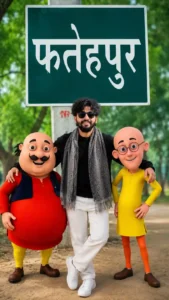
Create an ultra-realistic 8K cinematic portrait of the same person standing confidently in the center of the frame with a relaxed smile. Place a cheerful, chubby cartoon character inspired by a classic funny duo on the left side and a tall, slim cartoon companion on the right side. Both characters should have a polished modern 3D animated look with expressive faces, vibrant colors, and glossy Pixar-style rendering, while remaining clearly fictional.
The person wears a black knitted sweater, white pants, white sneakers, a grey textured winter scarf, and stylish black sunglasses exactly like the reference image.
Background: A lush green park with a large green signboard displaying the Hindi word “फतेहपुर” in bold white letters. Tall trees, soft sunlight filtering through leaves, shallow depth of field, creamy bokeh, and a natural outdoor environment.
Composition:
- Person standing in the center.
- Cartoon character on the left smiling toward the camera.
- Cartoon character on the right standing confidently with one hand on the waist.
- Both characters are approximately the same height as the person.
- Natural interaction, with the person placing one arm around each character’s shoulder.
- Eye-level camera angle.
Lighting:
Golden hour cinematic lighting, soft natural shadows, HDR, volumetric light rays, realistic skin tones, subtle rim light, ultra-clean highlights.
Camera:
Sony A7R V, 85mm f/1.4 GM Lens, f/1.8, ISO 100, ultra sharp focus, professional portrait photography, HDR, RAW quality.
Style:
Hyper-realistic human, premium 3D animated companions, seamless blending between real and animated subjects, vibrant colors, high contrast, realistic textures, depth of field, masterpiece composition, award-winning photography, ultra detailed, 8K, Unreal Engine quality, Octane Render, global illumination.
Aspect Ratio: 9:16
Resolution: 8K Ultra HD
Negative Prompt:
low quality, blurry, pixelated, noisy, duplicate characters, extra arms, extra fingers, cropped body, bad anatomy, distorted face, wrong facial identity, deformed hands, watermark, logo, text, oversaturated colors, unrealistic lighting, flat shadows, low resolution, artifacts, motion blur, poor blending, cartoon face on human, mutated body, bad proportions
Motu Patlu AI Image Prompt – Create Realistic 3D Cartoon Photo Editing Images
Meta Description
Discover the best Motu Patlu AI Image Prompt for creating realistic 3D cartoon-style photo edits. Learn how to generate high-quality AI images with lifelike lighting, cinematic backgrounds, and professional details.
Short Description
Create stunning Motu Patlu-inspired 3D AI images using detailed prompts. This guide explains how realistic cartoon photo editing works, the best AI tools to use, and tips for generating high-quality images.
Motu Patlu AI Image Prompt – Realistic 3D Photo Editing
Introduction
AI image generation has transformed digital creativity, making it possible to create professional-looking artwork in just a few minutes. One of the most popular trends among creators is designing realistic 3D cartoon-style images inspired by iconic animated characters. The Motu Patlu AI Image Prompt has become especially popular because it combines the charm of classic cartoon characters with realistic environments and cinematic photography.
Instead of creating a simple cartoon illustration, modern AI models can generate highly detailed scenes where Motu and Patlu appear naturally in real-world locations. From mountain roads and temples to city streets and parks, these images blend cartoon characters with realistic lighting, textures, and backgrounds for a unique visual experience.
Whether you’re creating content for social media, designing wallpapers, or experimenting with AI art, a well-crafted prompt can help you produce images that look creative, vibrant, and professional.
What Is a Motu Patlu AI Image Prompt?
A Motu Patlu AI Image Prompt is a detailed text instruction that guides an AI image generator to create artwork featuring the familiar cartoon characters in realistic 3D environments. Instead of relying on a simple description, a detailed prompt includes information about the setting, camera angle, lighting, facial expressions, clothing, colors, and overall mood.
For example, you can place the characters on a scenic mountain road, near a famous tourist destination, riding a motorcycle, or standing in a beautiful natural landscape. Adding realistic lighting and cinematic effects helps the AI produce images that feel more immersive while maintaining the recognizable cartoon style.
Why Realistic 3D Cartoon Images Are So Popular
Realistic cartoon photo editing has become increasingly popular because it combines nostalgia with modern AI creativity. Animated characters placed in realistic locations immediately capture attention and encourage people to interact with the content.
Creators enjoy experimenting with different locations, travel scenes, festivals, parks, and natural landscapes while keeping the playful personality of the characters intact. These images are widely shared on social media because they are fun, visually appealing, and easy to recognize.
Features of a High-Quality AI Prompt
A detailed prompt usually includes:
- Realistic 3D cartoon appearance
- Cinematic lighting
- Natural outdoor backgrounds
- High-resolution image quality
- Sharp facial details
- Dynamic poses
- Balanced composition
- Soft shadows and reflections
- Vibrant colors
- Professional depth of field
Including these details helps AI generate cleaner and more visually impressive results.
Best AI Image Generators
Several modern AI tools work well for creating realistic cartoon-style artwork.
Popular options include:
- ChatGPT Image Generation
- Google Imagen
- Midjourney
- Flux AI
- Leonardo AI
- Ideogram
Each platform produces slightly different artistic results, so experimenting with prompts can help you discover the style you like most.
Tips for Better AI Images
If you want professional-looking results, consider these suggestions:
- Use detailed scene descriptions.
- Mention realistic lighting conditions such as golden hour or soft daylight.
- Keep the composition clean and focused.
- Choose portrait ratios like 9:16 or 4:5 for social media.
- Add camera details such as 35mm or 85mm lens for a more photographic appearance.
- Avoid overcrowding the scene with unnecessary objects.
Small improvements in prompt quality often make a significant difference in the final image.
Where You Can Use These Images
Realistic cartoon AI images are suitable for many creative projects, including:
- Instagram Reels Covers
- YouTube Thumbnails
- Facebook Posts
- Pinterest Pins
- Wallpapers
- AI Prompt Collections
- Digital Posters
- Blog Featured Images
- Social Media Campaigns
- Creative Portfolios
Because of their colorful and engaging style, these images often perform well on visual platforms.
Common Mistakes to Avoid
Many beginners create prompts that are too short or lack important details. To improve image quality:
- Don’t use vague descriptions.
- Avoid mixing unrelated artistic styles.
- Keep the background consistent with the main subject.
- Use realistic lighting instructions.
- Focus on one clear scene rather than too many elements.
A well-structured prompt almost always produces better results.
Why Detailed Prompts Produce Better Results
AI image generators depend entirely on the information they receive. A detailed prompt gives the model enough context to create balanced compositions, realistic lighting, expressive characters, and natural backgrounds.
Instead of generating random elements, the AI follows your creative direction more accurately, resulting in cleaner and more professional artwork.
Frequently Asked Questions
What is a Motu Patlu AI Image Prompt?
It is a detailed text prompt designed to create AI-generated artwork featuring Motu and Patlu in realistic 3D-style environments.
Which AI image generator works best?
ChatGPT Image Generation, Google Imagen, Midjourney, Flux AI, and Leonardo AI all support detailed prompts and can produce high-quality results.
Can beginners create realistic AI images?
Yes. A detailed prompt combined with a modern AI image generator makes it easy for beginners to create impressive artwork.
Are these images suitable for social media?
Yes. Realistic cartoon-style images are widely used for Instagram, Facebook, Pinterest, YouTube thumbnails, and other creative platforms.
Why should I use a detailed prompt?
Detailed prompts help AI understand the scene more clearly, resulting in sharper images, better lighting, and a more polished final output.
Conclusion
The Motu Patlu AI Image Prompt – Realistic 3D Photo Editing style offers a creative way to combine beloved animated characters with realistic environments and cinematic photography. By writing detailed prompts and choosing the right AI image generator, you can create eye-catching visuals suitable for blogs, social media, wallpapers, and digital art projects.
Experiment with different locations, lighting conditions, and compositions to create unique images that match your creative vision while maintaining a clean and professional appearance